Screen Distance Matters More Than Brightness for Tired Eyes
Quick Answer: Eye strain from screens is mostly a focusing-muscle problem, not a light problem. The closer the screen, the harder your ciliary muscles work to hold focus, and holding that contraction for hours is what produces the ache. Moving a monitor from 20 inches to 28 inches reduces focusing demand substantially — more than any brightness or blue-light setting will.
You dimmed the screen. You installed the blue light filter. You bought the glasses.
And your eyes still ache at 4pm, which is roughly when they always did.

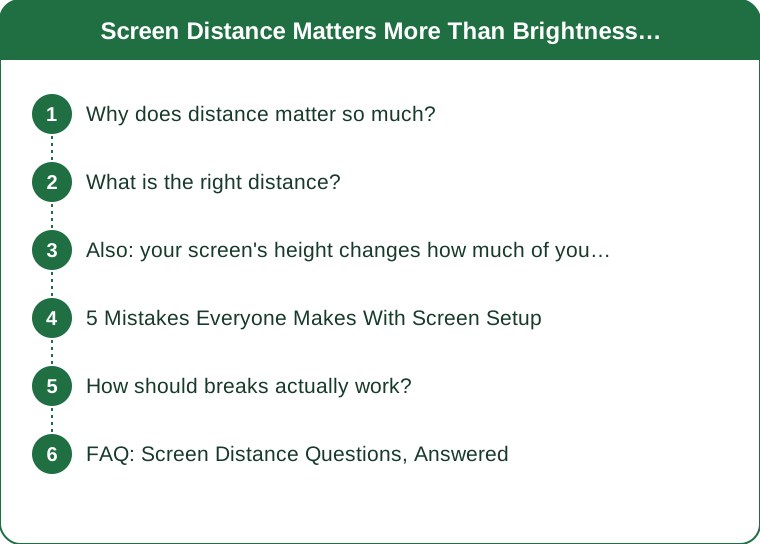
Why does distance matter so much?
Because focusing on something close requires continuous muscular effort, and that effort scales sharply with proximity.
Your eye focuses by contracting the ciliary muscle, which changes the shape of the lens. Looking at something 20 feet away requires almost no contraction. Looking at something 16 inches away requires a lot. The demand does not increase linearly — it climbs steeply as things get closer, which is why the last few inches matter more than you would expect.
Hold that contraction for six hours and you get exactly what you would get from holding any muscle contracted for six hours: aching, reduced control, and a slow return to normal afterward. The blurry-distance-vision effect when you look up from a laptop is that muscle failing to release quickly.
Brightness and blue light do contribute to comfort, but they do not create sustained muscular load. That is why adjusting them helps a little and never solves it.
What is the right distance?
The general guidance is roughly arm’s length, and it is more precise than it sounds.
- Monitors: 20-28 inches from your eyes, with 24-28 better if your text size allows it.
- Laptops: the problem case — typically 16-20 inches because the keyboard position dictates the screen position.
- Phones: 12-16 inches, and most people hold them at 8-12.
The rule that makes this actionable: increase distance and increase text size together. Most people sit close because the text is small. Push the monitor back six inches and bump the system font or zoom level up a step, and you have reduced focusing demand without losing readability.
If you use a laptop as your main machine, this is the argument for an external monitor or a laptop stand plus separate keyboard. It is not about posture alone — it is that a laptop physically cannot put the screen at a good focusing distance while the keyboard is at a good typing distance.
Also: your screen’s height changes how much of your eye is exposed
A second distance-adjacent factor, and it explains dryness rather than ache.
When you look up at a screen, your eyelids open wider and more of the eye surface is exposed to air. When you look slightly down, the lids cover more. A monitor mounted high means more surface area evaporating for eight hours.
This compounds with the other well-documented screen effect: blink rate drops from around 15-20 per minute to roughly 5-7 while concentrating on a screen, and the blinks that do happen are more often incomplete.
So a high monitor plus reduced blinking is the standard recipe for the gritty, dry feeling that people usually blame on brightness.
The fix is positional: the top of the screen at or slightly below eye level, so your gaze angles down about 10-20 degrees. This is also better for your neck, which is why it appears in every ergonomics guide — but the eye-surface reason is the one that explains why it helps dryness specifically.

5 Mistakes Everyone Makes With Screen Setup
1. Optimizing brightness before distance. Brightness should roughly match your surroundings, which takes ten seconds to set. Then stop adjusting it and fix the geometry.
2. Sitting close because the font is small. Backwards. Move back, then enlarge. Almost everyone can comfortably work at 125% zoom at 26 inches and finds it easier than 100% at 20.
3. Mounting the monitor too high. The common advice to raise your monitor was aimed at people looking down at laptops on desks. Raised past eye level, it increases eye surface exposure and neck extension.
4. Working in a dark room with a bright screen. The problem here is not the screen, it is the contrast ratio between screen and surroundings. Your pupils cannot settle. A small lamp behind or beside the monitor solves it.
5. Treating breaks as rest without changing focal distance. Closing your eyes rests the surface but not the focusing muscle. Looking at something 20+ feet away for 20 seconds is what releases the contraction.
How should breaks actually work?
The mechanism you are targeting is focal release, so the break has to change what your eyes are focusing on.
The distance reset: every 20-30 minutes, look at something at least 20 feet away for 20 seconds. Out a window is ideal because true optical infinity is further than most rooms allow. This is the classic 20-20-20 guidance and the reason it works is muscular, not restful.
The blink reset: ten deliberate full blinks, closing completely each time. Incomplete blinks do not spread tear film across the lower cornea, which is where dryness concentrates.
The near-far drill: hold a thumb at 10 inches, focus on it for three seconds, then focus on the furthest thing you can see for three seconds. Repeat five times. This actively cycles the ciliary muscle rather than just releasing it.
All three take under a minute combined. If your eyes ache at 4pm every day and none of these are in your routine, they are the highest-value thing to add before buying anything.
If strain persists despite good setup and regular breaks — or if you have headaches, double vision, or a sudden change — get an eye exam. Uncorrected astigmatism and presbyopia both present exactly as screen fatigue. This is general information, not medical advice.
FAQ: Screen Distance Questions, Answered
Do blue light glasses do anything?
The evidence for blue light filtering reducing eye strain is weak. What the glasses often do provide is a mild magnification or a prescription correction the wearer needed anyway, plus a reduction in glare. If yours help, that is worth something — but if you are still straining while wearing them, the geometry is the thing to change next.
Is a bigger monitor better or worse?
Better, if you use the extra size to sit further back rather than to fit more small text. A 27-inch screen at 28 inches with comfortable text is far easier on the eyes than a 24-inch at 20 inches. A big monitor used close is worse than a small one used at distance.
What about phones? I cannot move a phone to arm’s length.
You can move it further than you do — most people hold phones at 8-12 inches out of habit, and 14-16 is comfortable with a larger text size. Given the hours involved, increasing phone text size is one of the more effective changes available and one of the most resisted.
TL;DR:
- Eye strain is mostly sustained focusing-muscle contraction, and that demand climbs sharply as the screen gets closer.
- Aim for 24-28 inches on a monitor, and increase text size at the same time as distance.
- Top of screen at or slightly below eye level — a high monitor increases eye surface exposure and dryness.
- Breaks must change focal distance to work; closing your eyes does not release the muscle.
- Laptops cannot solve this alone — a stand plus separate keyboard is the fix.
The change to make today takes about a minute: push the monitor back until it feels slightly too far, bump the zoom one step, and drop the screen so the top edge sits just under eye level. Nothing about it feels dramatic, which is exactly why it gets skipped in favour of settings that are easier to change and do less.
Keep Reading
This article is for general informational purposes only and is not medical advice. Always consult a qualified health professional for guidance specific to you.